Everything you need to set up lead intake, understand messaging, and stay compliant.
Getting Started
ResponsePro is fully managed. We host your texting number, voice routing, compliance logging, and dashboard. You connect your lead sources and start getting faster replies.
What you get on each plan
Core ($179/mo)
Instant SMS when a new lead arrives
Missed-call SMS text-back where configured
Two automated follow-up messages after the instant reply
Up to 150 leads per month
Dashboard with inbox, leads, and weekly reports
No Voice AI call answering or custom first follow-up SMS at onboarding on Core.
Pro ($479/mo)
Everything in Core
Voice AI answers missed calls live (rolling out; qualifying questions; does not book appointments)
Four automated follow-up messages after the instant reply
Custom first follow-up SMS at onboarding (~1 hour after intake)
Start at onboarding.responsepro.app. The form collects your business details, plan choice, and carrier registration info (10DLC). You will also:
Verify your business phone with a one-time SMS code
E-sign your service agreement inside the form
Complete Stripe checkout for your monthly plan
You cannot submit the form until your phone is verified and the agreement is signed.
Step 2: We provision your account
Immediate: We start provisioning your account as soon as you complete onboarding — ordering a local texting number in your state and beginning brand and campaign registration.
3–5 business days: Carrier 10DLC approval. During this window, some messages may be delayed or blocked until carriers finish review. Your welcome email includes a private status link so you can check progress without logging in. If something needs a fix on your end (for example, a typo in your EIN), we email you with clear next steps.
Step 3: Connect your intake URL
When provisioning finishes, we email your unique intake URL:
https://intake.responsepro.app/{your_client_id}
Paste this URL into every lead source that can send a webhook: website contact forms, Google Local Services Ads, Angi, Facebook Lead Ads, Zapier automations, and similar tools. Setup guides:
Log in at dashboard.responsepro.app with the client ID and PIN from your welcome email. From there you can:
Read and reply to lead conversations in the inbox
See which sources send the most leads
Review missed calls (Core and Pro)
Download weekly performance summaries
Check provisioning and usage status
What happens when a lead arrives
When a lead hits your intake URL, our system queues an instant SMS once your account is live. Carrier delivery is typically within about a minute depending on your carrier. Automated follow-ups then run on a fixed schedule tied to when that specific lead came in, not when our system happens to run its next batch.
Core: follow-ups at 1 hour and 25 hours after intake; missed-call SMS text-back where configured
Pro: adds follow-ups at about 4 days and 11 days after intake, Voice AI call answering on missed calls (rolling out), and custom first follow-up SMS at onboarding
If the lead replies at any point, follow-ups stop automatically. See How It Works for the full flow.
How It Works
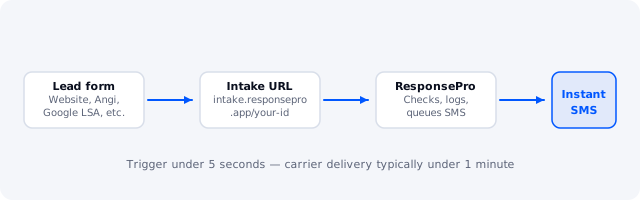
A lead form sends data to your intake URL. ResponsePro checks the lead, sends the first text, schedules follow-ups, and logs everything in your dashboard.
From form submit to first text
Your lead source sends a JSON webhook to https://intake.responsepro.app/{your_client_id}.
Our intake layer checks the request format, phone number, and payload size before forwarding anything.
ResponsePro checks whether this phone already contacted you in the last 24 hours (duplicate leads are skipped).
We check whether the person previously texted STOP (opted out). If so, no SMS is sent.
If the lead passes all checks, the instant reply goes out through your dedicated texting number.
We record the lead in your dashboard, email you an owner alert, and queue the follow-up sequence.
Your website form gets a fast success response. It does not wait on carrier delivery time.
Follow-up timing
Each follow-up is scheduled from the moment that lead first arrived. A lead that comes in at 3:00 PM gets the one-hour follow-up at 4:00 PM, even if our batch processor runs at 3:07 PM.
Step
When it sends
Included on
Instant reply
Queued instantly once live; carrier delivery typically within about a minute
Core and Pro
Follow-up 1
1 hour after intake
Core and Pro
Follow-up 2
25 hours after intake
Core and Pro
Follow-up 3
About 4 days after intake
Pro only
Follow-up 4
About 11 days after intake
Pro only
Every automated message ends with standard carrier language: message and data rates may apply, and reply STOP to opt out.
When follow-ups stop
A sequence cancels automatically if any of these happen:
The lead replies by text (or you reply from the dashboard before the next step)
The lead texts STOP or another opt-out keyword
Your plan only includes two follow-ups and both have already sent (Core)
Quiet hours
We do not send outbound texts between 9:00 PM and 8:00 AM in your local timezone. If a follow-up would land in that window, it moves to 8:00 AM the next day. Your timezone comes from onboarding, or from your business state if you left it blank.
Track leads by source
Include a source field in your webhook JSON so your dashboard shows which channels produce booked jobs. Common values: website, google_lsa, facebook, angi. Unknown values are stored as generic. See the multi-source tracking guide.
Missed-call recovery (Core and Pro)
When someone calls your business line and the call is not answered, ResponsePro can send an automated SMS text-back from your dedicated number on Core and Pro where missed-call recovery is configured. The same opt-out and quiet-hour rules apply. You set up call forwarding so missed calls reach our voice routing. See the call forwarding guide.
On Pro, Voice AI live call answering is rolling out — it may answer inbound missed calls before or alongside the text-back path when enabled.
Voice AI (Pro)
On the Pro plan, an AI assistant can answer inbound calls, ask qualifying questions, and log call outcomes in your dashboard. Call audio and transcripts may be processed to generate summaries and insights. The assistant can transfer the caller or end the call when appropriate — it does not book or schedule appointments.
You are responsible for any recording disclosure required by your state (one-party or two-party consent laws). Voice AI is not an emergency dispatch system. Dashboard call-insight views are rolling out as the feature ships; your signed Pro agreement describes the full scope.
Compliance & Opt-Out
Messaging rules are built into the product. STOP is honored immediately, sends are logged, and quiet hours are enforced on every outbound text.
What ResponsePro handles for you
10DLC brand and campaign registration with carriers — properly registered messaging so your texts are less likely to be filtered than unregistered DIY setups
STOP, START, and HELP keyword handling on inbound texts
Opt-out list that blocks instant replies, follow-ups, missed-call texts, and manual dashboard sends
Quiet hours (9:00 PM to 8:00 AM local) on all outbound messages
Compliance event logging for opt-ins, opt-outs, and suppressed sends
Opt-out keywords
If someone texts STOP, UNSUBSCRIBE, CANCEL, QUIT, or END, we immediately flag their number as opted out and send a short confirmation. They will not receive further automated messages from your ResponsePro number. You can still reach them by phone directly.
If they later text START or UNSTOP, we only re-subscribe them if they were previously opted out. A welcome-back message confirms they are opted in again.
HELP or INFO returns your business name and direct phone number. HELP replies are limited to once per 24 hours per number to prevent abuse.
Your consent responsibilities
You are responsible for getting proper consent before marketing texts go out. For recurring automated marketing SMS, your lead capture form must include, next to an unchecked-by-default checkbox:
Clear language that the person agrees to receive automated texts from your business
Giving consent is not a condition of purchase
Message frequency disclosure, STOP and HELP instructions, and message and data rates may apply
Every opt-out, opt-in, suppressed send, and compliance confirmation is written to an audit log tied to your account. Your dashboard error log surfaces delivery issues and rate-limit events without exposing customer phone numbers in plain text.
Blocking a number from the dashboard
You can block a number from your dashboard. That flags the contact as opted out in our system so no further automated texts go out. This follows the same enforcement path as a STOP keyword.
Phone Verification at Onboarding
Before you sign or pay, we confirm you own the business phone number on your application. This protects your account and matches carrier expectations for 10DLC registration.
How the verification code works
Enter your business phone number on the onboarding form.
Click Send code. A one-time code arrives by SMS within a few seconds.
Enter the code (4 to 8 digits) and click Verify code.
Once verified, the rest of the form unlocks for signature and payment.
Codes expire on their own. If yours expires, request a new one. You can try up to three send requests per phone every ten minutes.
Why this step exists
Confirms the phone on your application belongs to you before we provision a sending identity
Reduces fraud and wrong-number signups
Aligns with carrier rules for business messaging registration
This verification is separate from carrier brand review after payment. Sole proprietors may receive an additional one-time code from the carrier during brand registration. If that happens, our team walks you through it.
If verification fails
Double-check that you entered a mobile number that can receive SMS. Landlines and some VoIP numbers cannot get codes. If you still have trouble, email support@responsepro.app from the same address on your application.
API Reference
A full partner REST catalog is on the roadmap. Lead intake through your webhook URL is live today.
What works today
Lead intake is a simple HTTPS POST to your per-account URL:
POST https://intake.responsepro.app/{your_client_id}
Send JSON with at least a phone number. Optional fields include name, email, message, and source. Our intake layer validates the payload and forwards it to ResponsePro. There is no public OpenAPI document yet.
We are building a documented REST API for partners who want to push leads, pull analytics, or white-label ResponsePro. Contact us to join the waitlist.
 ResponsePro